Strava
Record and share the activity
The watch or application records the workout. Strava centralises the activity and retains its own tracking and sharing features.
Strava connection & CGM data
Running Data Plan does not replace Strava. Athletes continue to use Strava to record, centralise and share their activities. Running Data Plan adds a personal, glucose-focused analysis by matching an authorised activity with measurements retrieved separately from the athlete’s compatible CGM source.
Strava
The watch or application records the workout. Strava centralises the activity and retains its own tracking and sharing features.
Running Data Plan
The application separately synchronises CGM readings, aligns them with the workout timeline and creates complementary charts and indicators.
Running Data Plan does not reproduce Strava’s social feed, segments, clubs, challenges or community features. Its purpose is to help a connected athlete review their own activities using context that Strava does not provide: CGM readings, glucose ranges and their timing relationship with elevation, pace, heart rate or power.
An athlete’s Strava data is displayed inside that athlete’s own Running Data Plan account. It is not used to display other athletes’ activities and is not sold to third parties.
Connection
Data sources
| Strava activity data | Sport type, timestamps, duration, distance, elevation and description, plus timeline, GPS, altitude, heart rate, cadence, speed, moving status, power, grade and temperature streams when available and authorised. |
|---|---|
| CGM data | Glucose readings and trends available from LibreLinkUp, Dexcom Share, CareLink or Nightscout. This information is retrieved separately and never comes from Strava. |
| Matching process | Running Data Plan uses the activity start time and timeline to associate available CGM readings with the corresponding moments in the workout. Missing readings are never invented. |
If a field is absent—for example heart rate, power or GPS—the related indicator cannot be calculated.
Private analysis
Optional update to Strava
Under Account → Enrich Strava, the athlete chooses whether Running Data Plan may supplement new activity descriptions. Depending on the sport and available data, the block may include glucose summary values, running pace and VAM, elevation gain, cycling speed, cadence or power, plus a link to the athlete’s private analysis.
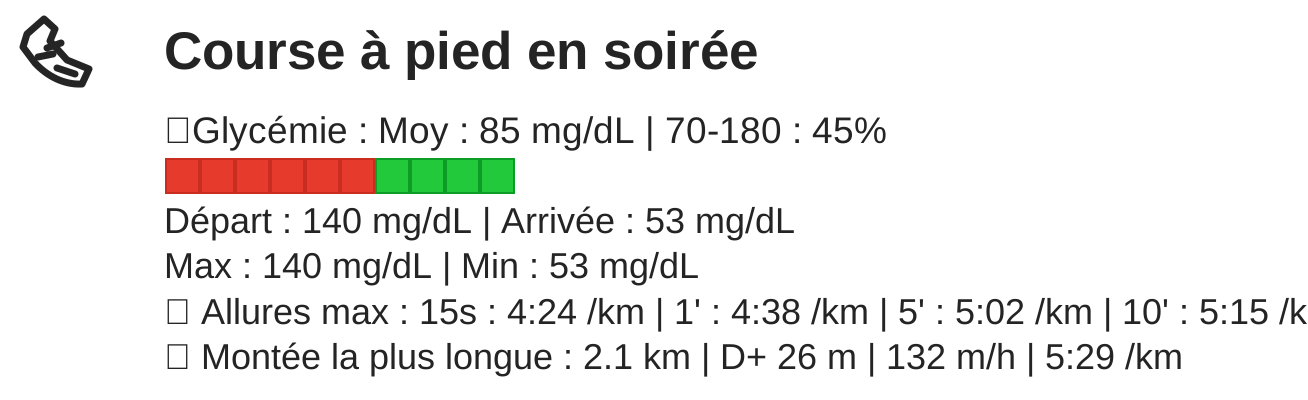
The athlete’s existing text is preserved. Running Data Plan replaces only its previous automatic block to prevent duplicates.
Permissions and control
The connection requests activity:read_all to retrieve authorised activities and streams, and activity:write to update a description when enrichment is enabled. Running Data Plan does not use these permissions to replace Strava or publish a competing social activity.
Athletes can disable description enrichment, disconnect Strava and contact support about their data.
Strava references
Running Data Plan is an independent application using the Strava API. It is not developed, sponsored or endorsed by Strava.